

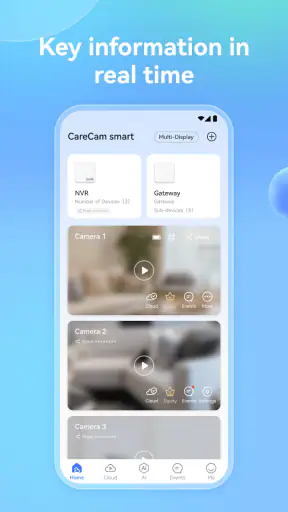
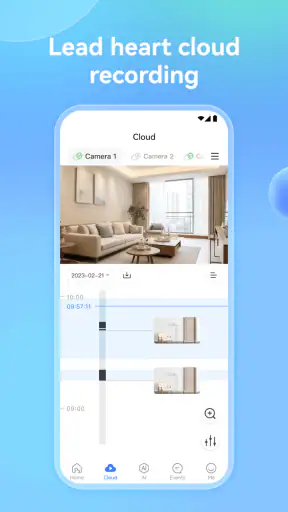
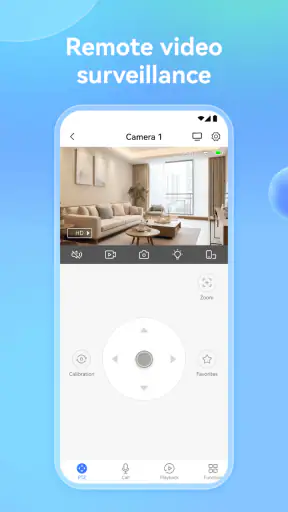
I approached CareCam Pro as a practical home-monitoring tool rather than as a polished smart-home showcase. Its purpose is easy to understand: it is designed to help you keep an eye on your home through a compatible camera setup. That makes it relevant for checking a room while you are away, watching over an entrance, or simply having a convenient way to look in on a familiar space from your phone.
The app is developed by Care Home and sits in the tools category. It is free to install, which makes the first step fairly low-risk. The store presents it as a home security system, but I would still treat it as one part of a wider setup rather than assuming an app alone can provide complete protection. A camera, a stable connection, sensible placement, and realistic expectations matter just as much as the software.
Its broad adoption is encouraging: CareCam Pro has passed one million installs, with an average score of 4.4 from roughly 33,000 ratings. Those figures suggest that many people find the basic experience useful, although popularity does not guarantee that it will work with every camera or suit every household. The important question is whether your equipment and daily routine match what this particular tool is built to do.
How CareCam Pro fits into everyday home monitoring
In normal use, an app like this is most useful when it reduces the number of steps between wondering what is happening and checking for yourself. Imagine leaving home in a hurry and later remembering that you are not sure whether a child’s bedroom window was closed. If your camera is already connected and positioned correctly, opening the app can be more convenient than returning home or asking someone else to check.
The same idea applies to less dramatic situations. You might want to look at a hallway when you hear a noise, check a room where a pet spends the day, or see whether an elderly family member is moving around normally. These are small moments, but they explain why a dedicated camera companion can be more useful than relying only on occasional physical checks.
I also like the fact that the app is aimed at ordinary phone users rather than being described as a specialist security console. The Everyone content rating makes it approachable for a household where more than one person may need to understand the basics. Still, “easy to use” should not be confused with “automatically secure.” You remain responsible for choosing who can access the camera, where it points, and when monitoring is appropriate.
One practical tip is to decide what you want to learn from the camera before mounting it. A camera aimed at a front door serves a different purpose from one aimed at a nursery, garage, or living room. If the view is too wide, important details may be hard to see. If it is too narrow, you may miss the movement that prompted you to check. Testing the viewing angle during daylight and at night is more valuable than simply placing the device in the most convenient spot.
What the free entry point really means
The app is free to download, so you can begin without committing to an upfront purchase for the application itself. That is useful for anyone who already owns compatible hardware and wants to test the companion experience before spending more on a different ecosystem. It also makes CareCam Pro easier to consider for a single-camera household that does not need an elaborate security platform.
There are in-app purchases ranging from $0.99 to $299.99 per item. I would not read that range as a recommendation to buy anything immediately. It means the free starting point and the possible paid value should be judged separately. Before paying, I would identify exactly what the purchase unlocks, whether it is essential to your intended workflow, and whether the benefit applies to your camera model and household needs.
This distinction is important because a free app can still become expensive if the features you actually need sit behind optional purchases. On the other hand, a paid option may be worthwhile if it replaces a more complicated arrangement that you would otherwise maintain through several unrelated services. The sensible approach is to use the free access to confirm that the basic connection and viewing experience suit you, then evaluate each purchase on its own merits.
I would also avoid comparing the highest possible purchase with the cost of the app alone. Your real total may include the camera, storage, networking equipment, or other services outside CareCam Pro. Those costs are not the same as the application’s price. For a fair decision, write down the complete setup you need and compare that with a competing camera system that includes its own mobile software.
Where the app can deliver useful value
The strongest value comes from convenience. If CareCam Pro works with the camera you already have, it can give you a single place to check a familiar view instead of treating remote monitoring as a technical project. That is especially appealing for people who want a straightforward tool and do not need a large collection of connected-home automations.
Another benefit is routine visibility. A camera app is not only for emergencies; it can support simple habits such as checking a delivery area, confirming that a door is clear, or looking in on a pet during a long day. These small checks can make the app feel worthwhile even when nothing unusual happens. In my view, that is a more realistic measure of value than imagining constant security alerts.
A useful workflow is to create a short checking routine rather than repeatedly opening the app without a purpose. For example, check the relevant view when leaving, once during the day if needed, and again before going to sleep. This reduces unnecessary phone use and helps you notice whether the camera is actually serving a need. If you find yourself checking constantly without gaining useful information, the problem may be camera placement or anxiety rather than missing software.
CareCam Pro may also be a good fit for a small household where one person manages the setup and another person only needs occasional access. In that situation, the value is not just remote viewing; it is having a familiar tool that can be explained without turning every check into a technical lesson. I would still make sure everyone understands the privacy boundaries before sharing access.
Tradeoffs that deserve attention
The first tradeoff is compatibility. A home-security app is only as useful as its relationship with the camera hardware. If your existing device is not supported or does not behave reliably with the application, the attractive free entry point will not solve the problem. I would check the exact camera model and test the connection before changing an established system.
The second tradeoff is dependence on the surrounding setup. Remote monitoring requires more than opening an app. Your phone needs connectivity, the camera needs power, and the home network needs to remain available. A camera can also be perfectly connected while pointing at the wrong area or producing a view that is difficult to interpret. CareCam Pro cannot compensate for every physical or network limitation.
There is also a difference between seeing a live situation and having a complete security record. I would not assume that an app described as a home security system automatically provides every function found in a dedicated alarm service. If you need a professionally monitored response, formal access controls, or a clearly defined recording arrangement, compare those requirements directly with the alternative products you are considering.
Privacy is another genuine consideration. A camera placed inside a home can capture family members, visitors, workers, and private routines. Before using the app regularly, decide which rooms should never be monitored and whether the camera should be turned away or disabled during private moments. Avoid treating convenience as permission to record everything. Good placement and careful sharing are part of responsible use.
I would also be cautious about paying before understanding the purchase path. The available purchase range is wide, so the right question is not “Is the app cheap?” but “What specific part of my setup am I paying for?” If the answer is unclear, stay with the free access while you investigate. A purchase should solve a known problem, such as a limitation you have already encountered, rather than a feature you may never use.
Small habits that make the experience better
A useful first-day test is to check the camera from the same location and from a second network if possible. The point is not to measure performance with laboratory precision; it is to discover whether the setup behaves as expected when you are away from home. If access works only under ideal conditions, you should know that before relying on it during travel or an important absence.
Keep the camera view purposeful. For a doorway, leave enough context to understand movement without exposing more of the home than necessary. For a pet area, place the camera where the animal normally spends time instead of aiming at an empty corner. For an older relative, think about dignity and consent as carefully as visibility. The best view is not always the widest view.
Use labels or a simple mental map if you have more than one camera. Confusion between a hallway view and a side entrance can waste time when you are already concerned. Even without turning the app into a complex dashboard, consistent naming and a fixed checking order can make everyday use calmer and faster.
Finally, treat occasional checks as a maintenance habit. Confirm that the camera has not been moved, that the view is not blocked, and that the phone can still reach it when you are away. A system that worked during setup may become less useful after furniture changes, a router replacement, or a camera being accidentally tilted. These are ordinary household issues, but they affect the experience more than a glossy feature list does.
Who is likely to get the most from it
CareCam Pro makes the most sense for someone who already has, or is considering, compatible home-camera hardware and wants a free mobile starting point. It is particularly suitable for a modest setup: one or a few familiar views, occasional remote checks, and no immediate need for a fully managed security service.
It can also suit people who prefer a focused tool over a broad smart-home platform. If you do not want lighting controls, appliance automation, voice routines, and multiple dashboards mixed together, a camera-centered app may feel easier to understand. The tradeoff is that a narrower tool may not become the best choice if your household later grows into a more complicated connected-home system.
I would be more hesitant to recommend it to someone who expects the application to function as a complete replacement for an alarm company. It is also not the obvious choice for a user who needs guaranteed professional intervention, highly formal security management, or a carefully documented recording workflow. In those cases, a dedicated security provider or a camera ecosystem built around those requirements may be a better fit, even if the initial cost is higher.
It may not suit a person who dislikes troubleshooting. Camera apps can involve practical questions about hardware, network access, positioning, and household privacy. If you want a system that arrives as a tightly integrated package with extensive support, compare the total ownership experience rather than choosing solely because the app itself is free.
How it compares with usual alternatives
The usual alternatives fall into two broad groups. One is a manufacturer-specific camera app bundled with a single hardware family. That route can offer a more predictable match between camera and software, but it may lock you into that brand’s equipment. CareCam Pro is attractive when its compatibility matches what you already own and you want to avoid replacing everything at once.
The other alternative is a broad smart-home platform. These services can be better when you want cameras to interact with lights, locks, sensors, or voice assistants. They may also provide a more unified experience across several types of devices. However, that wider scope can bring extra setup and more menus than someone seeking simple room checks actually needs.
My practical comparison would therefore begin with the camera, not the app. If the hardware is already installed and CareCam Pro gives you the view and access you need, the free starting point is compelling. If you are buying a complete system from scratch, compare the camera quality, support, privacy controls, storage terms, and total purchase path of the alternatives before deciding that the app’s free installation makes the whole solution better value.
My verdict on value
After weighing the convenience against the setup responsibilities, I see CareCam Pro as a sensible option for straightforward camera monitoring, especially when you want to test a free tool before making a larger commitment. Its value is strongest when it turns an existing compatible camera into something you can check naturally during the day.
I would install it for a small household that needs practical visibility rather than a full security command center. I would begin with the free access, verify the camera connection away from home, adjust the viewing angle, and only then consider an in-app purchase tied to a clearly understood need. That order protects you from paying for features before you know whether the basic experience works.
My recommendation is more cautious for anyone seeking professional-grade protection or a complete smart-home ecosystem. In that situation, another option may offer a better match, even if it costs more or requires a more involved installation. CareCam Pro is not automatically the right answer because it is popular or free to start; it is the right answer when its focused home-monitoring role fits your equipment and expectations.
For eligible users, the current release is version 2.9.36 and it runs on Android 7.0 or later. That gives the app a broad device starting point, while the Everyone rating keeps it accessible for general household use. Overall, I would describe it as a practical first step rather than a complete promise of home protection: useful, approachable, and worth trying when your needs are clear, but best judged by the real camera workflow and the exact value of any optional purchase.


